
Trying Microsoft Fingerprint Reader
Originally published on my old blog at cumps.be on January 7, 2005.
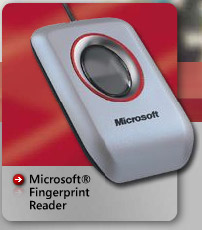
Today I got the chance to experiment with the Microsoft Fingerprint Reader and I love it!
I believe this is very useful for elder people who can’t remember any passwords at all. For example, I can now setup a computer for my grandmother, and the only thing she has to do when use it, is touch the reader briefly.
Yes, I already hear people saying, why not set it to logon automatically for her or use a password manager? Well, I don’t want to have it login automatically, because it could have multiple users, like her grandchildren. And I didn’t use a password manager, well, because I had to change to test this, which is in essence a sort of password manager.
Bringing up the point about her grandchildren, it can be configured to detect who touches the reader and log in to the right account as well, and also allows fast user switching by a touch.
The installation was very easy and clear, with graphics explaining how to register your fingerprint with the reader. Everything is very dummy-proof, making it perfect for a normal user on a normal XP installation.
As a normal user mostly uses IE, it doesn’t matter if it doesn’t work 100% in Firefox (as I have read somewhere). I like the simplicity, the wizard to create a new website logon is also very clear, indicating which field is the username field, the password field and the logon submit button.
It does say it shouldn’t be used for corporate networks, but as this is mainly a home product, that’s not a big problem. It’s really a useful tool.



You May Also Like
Abit motherboard killed RAM (Abit IT7-MAX2)
I don't like Abit anymore. There you go, I said it. Why? My motherboard killed a RAM module. (My motherboard is an Abit IT7-MAX2)

Keeping the Old Addresses Alive
Nobody migrates email in one day. Fetchmail, a receive-only alias domain, and permanent redirects bridge the old world into the new one.

Making Roundcube Not Look Like 2012
Webmail is the face of the platform, so it got a Gmail-shaped skin, real calendar and contacts integration, and some money spent on polish.