
NSurvey - Survey Overview
Originally published on my old blog at cumps.be on February 21, 2005.
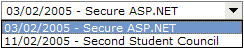
The first thing I noticed is the small dropdown in the admin section listing all available surveys. This would become my starting point for users, a perfect place to choose the survey they want to take.
I tracked this down to the SurveyListControl user control which I inherited to create SurveyListControlOverview. This user control removes to automatic postback when it’s in overview mode and also provides an OverviewSurveyId property to indicate the selected survey. It also displays all surveys, because it had to run in anonymous mode, without users having to log on before being able to answer. A shared password would be provided on the event, giving access to the survey.
After this, the user could select a survey from the dropdown list. The only problem was that the choices were ordered by creation date, which would become a problem in the long run when a lot of surveys would be available. To change this I added a simple ORDER BY Title in the vts_spSurveyGetList stored procedure.
At this point, I had a dropdown list with all surveys listed alphabetically to add to any aspx page I wanted.



You May Also Like
NSurvey - Answer Types
By default NSurvey provides different kinds of answer types. These are for example Basic Field, Rich Field, Calendar Field, Email Field, Hidden Field…
NSurvey - Belgian Regions
One of the standard controls of NSurvey is the Country List, which provides a dropdown list of countries. Belgium is one of these countries, but when you…
NSurvey - Matrix Questions
NSurvey supports matrix questions in its surveys. The only problem with this type of question was that in the reporting section of NSurvey, it listed each…