
NSurvey - Pie Charts
Originally published on my old blog at cumps.be on February 22, 2005.
NSurvey already provides general charts displaying the results, but it uses a bar chart and I had to output pie charts as well. So, I implemented them as well.
First, I created a new page, called PieChartReport.aspx, which was empty. After this I used the same code as the BarChartReport and filled up a ChartPointCollection, which I then used to create a new PieChart, render it and send it back to the client
ChartEngine engine = new ChartEngine();
ChartCollection charts = new ChartCollection(engine);

engine.Size = new Size(350, 400);
engine.Charts = charts;
engine.Title = new ChartText();

if (questions.Questions[0].IsParentQuestionIdNull()) {
  engine.Title.Text = Server.HtmlDecode(
          Regex.Replace(questions.Questions[0].QuestionText, "<[^>]*>", " "));
} else {
  String questionText = String.Format("{0} - {1}",
                      questions.Questions[0]["ParentQuestionText"].ToString(),
                      questions.Questions[0].QuestionText);
  questionText = questionText.Replace(Environment.NewLine, "");
  questionText = questionText.Replace("\t", "");
  questionText = questionText.Replace("<p>", "");
  questionText = questionText.Replace("</p>", "");
  engine.Title.Text = Server.HtmlDecode(
                                 Regex.Replace(questionText, "<[^>]*>", " "));
}

PieChart pie = new PieChart(data);
engine.Charts.Add(pie);
ChartLegend legend = new ChartLegend();
legend.Position = LegendPosition.Bottom;
engine.HasChartLegend = true;
engine.Legend = legend;
engine.GridLines = GridLines.None;
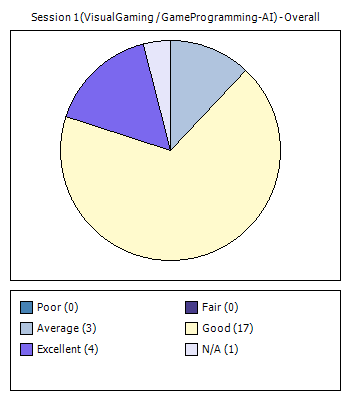
Update: I used the following control by the way (which was already in NSurvey): http://www.carlosag.net/Tools/WebChart/Default.aspx



You May Also Like
NSurvey - MapPoint Integration
NSurvey provides charting reporting by default, but this could be enhanced by using the Country List control together with the added Belgian Regions. With…
NSurvey - Answer Types
By default NSurvey provides different kinds of answer types. These are for example Basic Field, Rich Field, Calendar Field, Email Field, Hidden Field…
NSurvey - Belgian Regions
One of the standard controls of NSurvey is the Country List, which provides a dropdown list of countries. Belgium is one of these countries, but when you…