
Daemon Tools - The Disk Image Emulator
Originally published on my old blog at cumps.be on August 19, 2007.
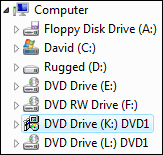 Ever wanted to install something but couldn’t be bothered to burn it to a disc first? Like the Visual Studio 2008 Beta 2 discs for example. Daemon Tools is the answer!
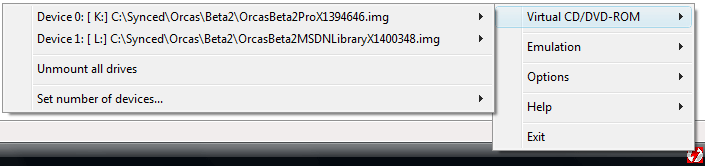
It’s a free utility, which emulates a disc drive, allowing you to simply point to a disc image and mount it, making Windows think a real DVD got entered in a real DVD player.
Behind the scenes Daemon Tools is working it’s magic through a SCSI device driver, called SPTD, which is included with Daemon Tools. It’s this driver which takes care of adding new devices in Windows for Daemon Tools to use, making it possible to access your images like normal physical discs. All of this magic is happening transparently though, besides one right click and selecting the image file you’d like to use.
Daemon Tools is probably one of the most famous emulators out there, with some great advantages:
- You don’t have to play disc jockey when installing multi-CD software.
- It’s a lot faster than using physical discs.
- Doesn’t wear down your original discs, just take an image of the disc and put the physical one away somewhere.
- Works better than having to copy the files on the disc to your hard drive. Some installers are really dumb and refuse to work properly when not run from the root drive.
- Makes distributing disc images more attractive.
When installing a new computer, Daemon Tools is one of the first tools I put on there, because it’s that useful and stable. It supports nearly all possible disc image format in existence and makes my live so much easier.
I used to be ejecting and inserting discs all the time with bigger software installs, now I simply mount four drives at once, start the Setup and come back when it’s done without having to switch anything.
Try it, love it, keep it.



You May Also Like
Hacking Uxtheme.dll - Watercolor Theme
One thing I immediately do on a new pc is get it personalized. This includes changing icons and wallpapers, but also resource hacking the run box and…
Random Wallpaper through Scheduled Tasks
With my new laptop I got a screen with a 1920x1200 resolution, so I went out looking for wallpapers for the resolution, because my existing ones degraded…
Custom Run Box (Resource Hacking)
It's time for a new article, but not about C this time. I'll tell you how to modify Windows, we'll change the Run box and make it look like this: