

XAML: Irregular Controls
Originally published on my old blog at cumps.be on February 22, 2004.
The Longhorn SDK enables you to create XAML apps from VS.NET, so I did.
One of the things I’ll be looking for is an editor that generates XAML for me. Because, I find XAML “difficult” to write. Yes it’s powerful and “easy” to do, but if you have to do it all by hand, it takes time. So I’m hoping there will be an editor soon :)
I’ve seen the demo during the DevDays, where you had a different layout per user. And one of those was the kiddie layout, with the very cool button, which was shaped totally differently. So I set out to create a ‘NTFS Permissions For Dummies’.
Here’s what I created in Photoshop as a quick idea of what I wanted:

Looks kiddie enough, doesn’t it?
Then I started my quest, it seems Longhorn doesn’t like it when I want to skew a ListBox with AngleX or AngleY. When I go over the items it renders strange lines everywhere in my app. Notice the blue lines:
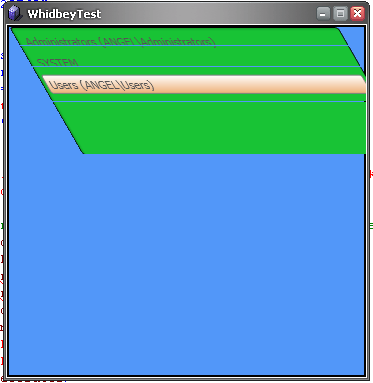
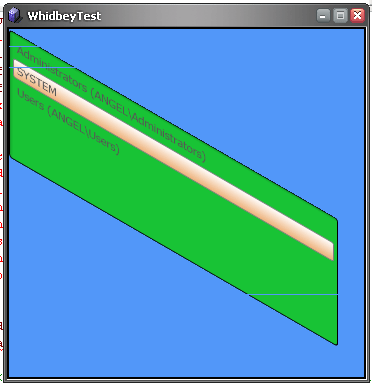
This is the XAML I used (skewbug.txt); the second screenshot only changes AngleX to AngleY. It also happens with other values.
<TransformDecorator AffectsLayout="False">
  <TransformDecorator.Transform>
    <TransformCollection>
      <SkewTransform AngleX="30" />
    </TransformCollection>
  </TransformDecorator.Transform>
  <ListBox ID="ntfsUsers" Canvas.Top="27" Canvas.Left="10" Width="329" Height="128" Background="#18c335"
           BorderBrush="Black" BorderThickness="2" />
</TransformDecorator>
Gone was my idea to create these nice shaped controls.
But the gradient worked! And that’s actually very nice.
Here’s what I ended up with:
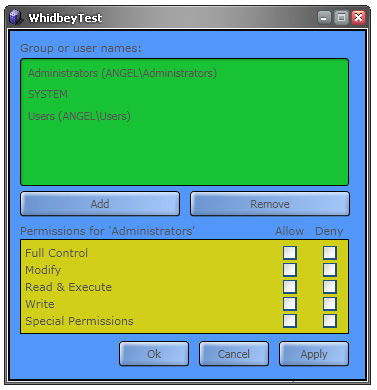
It looks kinda nice, the colors still make it look kiddie-like.
Going to try writing the C# code-behind later this week if I find some time.



You May Also Like

Student Evangelist: Longhorn Screenies
My own Longhorn pre-alpha screenshots: the desktop, Ctrl-Alt-Del, IE's new Clear Browsing Records and Visual Studio Whidbey.

I'm on Longhorn: Download Manager == Evil!
Longhorn finally installed on my laptop: tweaks, Whidbey BSODs, a first XAML file, and a Download Manager you can't stop.

Longhorn Installation Failing: 'An Error Occurred While Copying Files'
The Longhorn pre-alpha setup kept failing at 13 minutes left with 'An error occurred while copying files', on my laptop and in Virtual PC alike.