

Notepad Bug? Encoding Issue?
Originally published on my old blog at cumps.be on February 27, 2004.
Someone showed me a weird text file today. It was a batch file with copy MeYou.bak MeYou.txt. When you ran it, it worked. But when you opened it in Notepad, there was nothing.
So we decided to look a bit into this and here is something we came up with to ‘create’ invisible text:
Open Notepad and enter:
' abc.bak abc.txt'
(That is: space abc dot bak space abc dot txt, no line break, without the quotes)
It doesn’t work with every string, just follow us on this example and use that one.
Save your file. Notepad picks ANSI as the default encoding.
Open your file, Notepad seems to open by default in Unicode encoding.
Your text is now invisible.
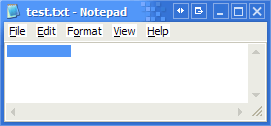
Does anyone know why the saving default is different from the opening default?
And why does it happen to that particular piece of text? It doesn’t happen to ' b.b b.b' or ' .bak .txt'.
It looks the same when viewing it through a hex editor. But apparently it has something to do with encoding.
Update: When you paste it in IE or Trillian you get ‘????????’, like some people tried in the comments ;)
Update2: In my Notepad screenshot the font was Terminal, when I choose Verdana they are indeed squares. Not that invisible anymore, but still wrong :)
Update3: You can find an explanation on why this is happening at The Old New Thing.



You May Also Like

Hardware Lasts Longer under Linux, or How Politics Don't Have a Clue
A Belgian party argued for Linux in government because PCs would last longer; my 2004 take on why their arguments didn't hold up.

Orkut: An Overview
A first look at Orkut, Google's invite-only social network: profiles, friends, communities and a lot of personal questions.

How This Blog Is Served
The machinery behind the words you're reading: Hugo, an unprivileged nginx, a strict CSP, and a deploy script.