

Visual Basic 6 DBGrid: Empty Cells AllowSizing Bug?
Originally published on my old blog at cumps.be on April 1, 2004.
Something not .NET related, regarding VB6.
Here is some strange behaviour:
Create a new .EXE project with the following References and Components:
- References: Microsoft DAO 3.51 Object Library
- Components: Microsoft Data Bound Grid Control 5.0 (SP3)
Add a DBGrid to your form with its DataSource set to datQuery (Data).
Add a textbox and a button as well, and put this code in it:
Option Explicit

Private Sub cmdExecute_Click()
  Call LoadTable(txtquery.Text)
End Sub

Private Sub LoadTable(strQuery As String)
  Dim Db As Database, Rs As Recordset

  Set Db = DBEngine.Workspaces(0).OpenDatabase(dbPath)
  Set Rs = Db.OpenRecordset(strQuery)
  Rs.MoveLast
  Rs.MoveFirst
  Set datQuery.Recordset = Rs

  Me.Caption = "Query - Colums: " & Rs.Fields.Count & " - # Records: " & Rs.RecordCount
End Sub
Run your code, and this is what it should look like:
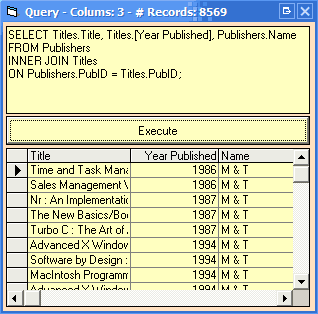
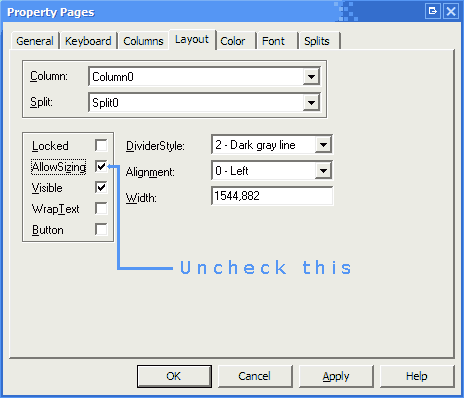
Now, go to the Custom properties of the DBGrid, to the Layout tab and uncheck AllowSizing.
Run your program again, and now your DBGrid will indicate there are results, but there will be no text, like this:
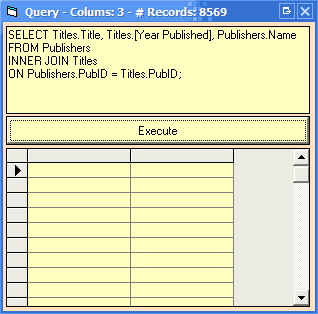
Why is it doing this? I really have no idea. But the best part is, when you check the AllowSizing property again, it isn’t back to normal. It stays broken.
I encountered this ‘bug’ (don’t know if it’s a bug) some days ago, I reproduced it this afternoon, and I’ve now installed VS6 SP6, but the bug remains.
If anyone wants a project which has the bug in it, I uploaded something small (30 KB) that got destroyed by this.
Update: Just when I posted this and looked at my post again, I noticed something, the second screenshot only had 2 columns, so I realized it did fetch the records, but didn’t know where to display the data. And when you right click and choose ‘Clear Fields’ it works again. But AllowSizing is automatically checked on again. I haven’t found a way to uncheck AllowSizing without the grid resetting its own columns.



You May Also Like

How This Blog Is Served
The machinery behind the words you're reading: Hugo, an unprivileged nginx, a strict CSP, and a deploy script.

Keeping the Old Addresses Alive
Nobody migrates email in one day. Fetchmail, a receive-only alias domain, and permanent redirects bridge the old world into the new one.

Making Roundcube Not Look Like 2012
Webmail is the face of the platform, so it got a Gmail-shaped skin, real calendar and contacts integration, and some money spent on polish.