

Boxing/Unboxing in .NET
Originally published on my old blog at cumps.be on February 14, 2005.
In the .NET Framework there is a feature called boxing, which goes hand in hand with unboxing. Boxing is an implicit conversion of a value type to the object type. While this is a very nice feature when programming normal applications, this overhead becomes a big performance hit when working with algorithms that need to do lots of operations, such as path finding.
When you create a value type, it’s originally placed on the stack. If you box this value type, the required memory is allocated on the heap, the value gets copied and an object is placed on the stack, pointing to the boxed value on the heap.
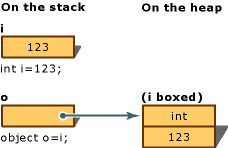
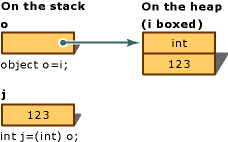
In a pathfinder I created long ago, in the .NET 1.1 era, a list of points had to be maintained. While this was possible using an ArrayList, it proved faster to write a typed list. The main reason was that the ArrayList’s method signatures all work with objects, causing implicit boxing when using them. Retrieving items from an ArrayList also required unboxing, because the items had to be cast back to their Point type.
I wrote a small application to demonstrate the boxing and unboxing taking place, and the performance impact. The test data were 10 million random Point values.
// Adding to an ArrayList
for (int i = 0; i < itemsToGenerate; i++) {
  arrayList.Add(rndCosts[i]);
}
When we take a look at the IL code this piece generates, we would see the following:
ldobj [System.Drawing]System.Drawing.Point
box [System.Drawing]System.Drawing.Point
callvirt instance int32 [mscorlib]System.Collections.ArrayList::Add(object)
On the second line, you can see it uses the box operation to box our value type Point (stored in the typed Point array rndCosts) before calling the Add method.
The solution to this is using generics, available from .NET 2.0 onwards, or writing your own typed list object. As .NET 1.1 had to be used, I chose the second solution. To do this, I used Reflector to look at the ArrayList code, and used that code to create a new list, replacing all instances of object with our required type, Point in this example.
Now we use the same piece of test code with our PointList.
// Adding to a typed PointList
for (int i = 0; i < itemsToGenerate; i++) {
  pointList.Add(rndCosts[i]);
}
If we look at the IL this piece generates, we notice the following:
ldobj [System.Drawing]System.Drawing.Point
callvirt instance int32 [PointList]CumpsD.Collections.PointList::Add(
                        valuetype [System.Drawing]System.Drawing.Point)
The Framework does not use the box operation anymore, effectively getting rid of the overhead we had with our first solution. When we take a look at the test results, we can clearly see the difference between the first solution and the second.
ArrayList: added 10000000 items.
00:00:03.1845792 seconds
PointList: added 10000000 items.
00:00:00.2804032 seconds
By using the strongly typed PointList it was possible to get a lot more performance out of the code, making the project operate better in the long run. Just for fun, I revisited this test using .NET 3.5, with generics and created a List<Point> to store the items. I ended up with similar performance (00:00:00.2915599 seconds) to the typed list I created in .NET 1.1, pretty good considering I wrote it two years ago ;)
The main conclusion here is to avoid any non-typed collection when performance is an issue. Some brownie points for our Bits & Bytes Religion when it comes to the happy feeling you get when working with generics :)



You May Also Like

Imagine Cup
Microsoft's Imagine Cup, an international student contest with several categories, and the task it gave me during my internship.

A* Algorithm
How the A* pathfinding algorithm works: the open and closed lists and the F, G and H scores, demonstrated on a grid of pixels.

Binary Heaps
Speeding up A* by keeping the open list in a binary heap stored in an array, with add and remove in C# and timings against a sorted ArrayList.