

eID.Chat
Originally published on my old blog at cumps.be on April 3, 2005.
To demonstrate the possible use of eID in Windows applications, I created a small client/server application. This application contains a central server, which listens on a certain port for possible clients. After a client connects, it has to authenticate with the user’s eID card. The server then validates the certificate and checks if it is in the list of users allowed to connect.
If everything is valid, the client can connect and chat with other clients. Every message sent to the server is signed by the client and validated, making sure each message arriving at the server originated from that user. The server then extracts the username from the certificate and uses this to broadcast the message to the other clients. Ultimately, this means users only have to insert their eID card, enter their PIN and are safely chatting away with others.
The steps used to authenticate a client are as follows:
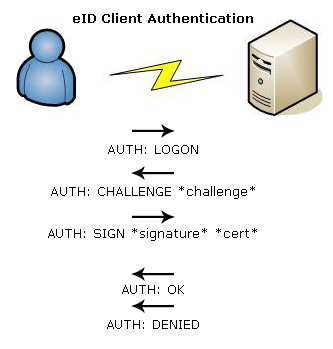
- The client asks for a logon.
- The server sends a random challenge back to the client and remembers this value.
- The client signs this challenge and sends the signed challenge back to the server along with its certificate.
- The server first checks if the serial number of the certificate is in the database of allowed serials, otherwise the client gets denied.
- After this it checks if the certificate is still valid. If it is expired or revoked, it denies the client.
- The server takes the public key from the certificate and verifies the signature of the client.
- If the signature is valid, the client is really who they claim to be, and is allowed to log on. The client certificate is stored to be used for future communication verification and to extract the client’s name to include in the broadcast messages.
These steps can be implemented with CAPICOM or WSE in C# to provide authentication with eID. The source code is available with my eID in .NET session.



You May Also Like

Remoting Client-Side
The consumer side of .NET Remoting: an ASP.NET web service that gets the controller object from a Windows Service on the same machine.

Remoting Server-Side
Controlling a Windows Service with .NET Remoting instead of ServiceController, which could only send integers and got nothing back.

Windows Services
Windows Services, how they differ from the usual Windows Forms approach for business applications, and how I built one.