

Configuration
Originally published on my old blog at cumps.be on April 9, 2005.
To configure the solution, Enterprise Library was used. This contained a Configuration Application Block which allowed defining various configuration sources externally from the application. This approach gave the ability to switch from XML configuration files to a database without having to change anything in the code. Because of this, it was also possible to distribute the application, and let an administrator choose where it should read the configuration from. An additional advantage of using the application block was the ability to automatically detect when the configuration had changed and retrieve the new values.
The easiest way to implement configuration was to create a new project which contained all the possible configuration sections in the solution. Each configuration section was defined by a different class.
For example, to make the port used by Remoting in the application configurable, I created a class which contained this value, together with a public property for it. This class uses the System.Xml.Serialization namespace, because it was serialized to XML, and the application block uses the public properties to populate the configuration data.
A default constructor also had to be present for XML serialization.
The configuration data for the player, for example, was contained in the PlayerData class, which looked like this:
using System;
using System.Xml.Serialization;

namespace MediaService.Configuration {
  public class PlayerData {
    private Int32 remotingPort;

    [XmlElement("RemotingPort")]
    public Int32 RemotingPort {
      get { return this.remotingPort; }
      set { this.remotingPort = value; }
    } /* RemotingPort */

    public PlayerData() { }

    public PlayerData(Int32 remotingPort) {
      this.remotingPort = remotingPort;
    } /* PlayerData */
  } /* PlayerData */
} /* MediaService.Configuration */
To use these values, a reference to the Configuration project had to be added, together with a reference to Microsoft.Practices.EnterpriseLibrary.Configuration. After this the configuration could be loaded with the following code:
using Microsoft.Practices.EnterpriseLibrary.Configuration;

namespace MediaService.Player {
  public class PlayerService : System.ServiceProcess.ServiceBase {
    private PlayerData configData = null;

    private void LoadConfiguration() {
      ConfigurationManager.ClearSingletonSectionCache("playerConfiguration");
      try {
        this.configData = ConfigurationManager.
                        GetConfiguration("playerConfiguration") as PlayerData;
      } catch (Exception ex) {
        this.configData = new PlayerData(4000);
      }
And to receive notifications the following code had to be added:
protected override void OnStart(string[] args) {
  ConfigurationManager.ConfigurationChanged += new
  ConfigurationChangedEventHandler(ConfigurationManager_ConfigurationChanged);
} /* OnStart */

private void ConfigurationManager_ConfigurationChanged(object sender,
                                            ConfigurationChangedEventArgs e) {
  this.LoadConfiguration();
  // Check new values and perform possible actions
} /* ConfigurationManager_ConfigurationChanged */
At this point, all code needed for configuration was done. Now the Enterprise Library Configuration tool had to be used to configure the application’s configuration source.
First, a new application had to be defined by using File > New Application. Then the Configuration Application Block had to be added through Action > New > Configuration Application Block. After this, a new configuration section was added by right clicking on the new application block and selecting New > Configuration Section.
This new section was called playerConfiguration, as it is in the code, and uses an XML Storage Provider and an XML Serializer Transformer, both added by right clicking the new section and selecting them from the New menu.
The only thing that still had to be changed was the XML Storage Provider: its FileName had to be set to playerConfiguration.config. After this, the configuration had to be saved.
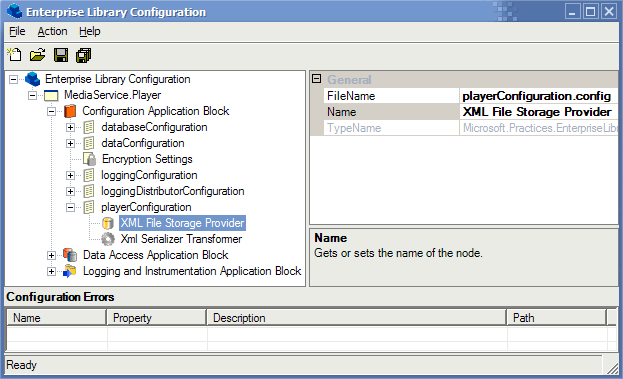
The XML file used for configuration was the following:
<?xml version="1.0" encoding="utf-8"?>
<playerConfiguration>
  <xmlSerializerSection type="MediaService.Configuration.PlayerData,
                              MediaService.Configuration,
                              Version=1.0.0.0,
                              Culture=neutral,
                              PublicKeyToken=null">
    <playerData xmlns:xsd="http://www.w3.org/2001/XMLSchema"
                xmlns:xsi="http://www.w3.org/2001/XMLSchema-instance">
      <remotingPort>4000</remotingPort>
    </playerData>
  </xmlSerializerSection>
</playerConfiguration>
The only thing left to make sure the application loaded the configuration during testing was to provide a post-build event that copied the configuration file. To do this, in the project’s properties, under Common Properties was a Build Events menu, where it was possible to define the post-build event. The following had to be used to copy the playerconfiguration.config file:
copy "$(ProjectDir)playerconfiguration.config" "$(TargetDir)" >Nul
When the application was started, it would call the LoadConfiguration method, which would populate the PlayerData class and provide all configuration settings of the application. If the configuration file was changed while the application was running, the ConfigurationChanged event would be raised and the new configuration would be used.



You May Also Like

Logging
Adding configurable logging to the internship project with the Enterprise Library Logging and Instrumentation Application Block.

Remoting Client-Side
The consumer side of .NET Remoting: an ASP.NET web service that gets the controller object from a Windows Service on the same machine.

Remoting Server-Side
Controlling a Windows Service with .NET Remoting instead of ServiceController, which could only send integers and got nothing back.