

Data Layer: SQL Server
Originally published on my old blog at cumps.be on April 25, 2005.
After having implemented a data layer in the Data project, it was time to make a real data implementation. A SQL Server 2000 implementation was the default data source, located in the Data.SqlServer project.
Enterprise Library was used to provide the data access to SQL Server. This contained a Data Access Application Block, which allows configuring the connection string through the Enterprise Library Configuration tool.
A reference to Microsoft.Practices.EnterpriseLibrary.Data was needed, together with the Configuration and Common assemblies of Enterprise Library.
Through the Enterprise Library Configuration tool, an existing App.config was loaded, where the Data Access Application Block was added. The database and server values had to be set to the actual server being used, together with the database containing the data. Additional connection string properties could be added as well, for example, the Integrated Security property, which is set to True.
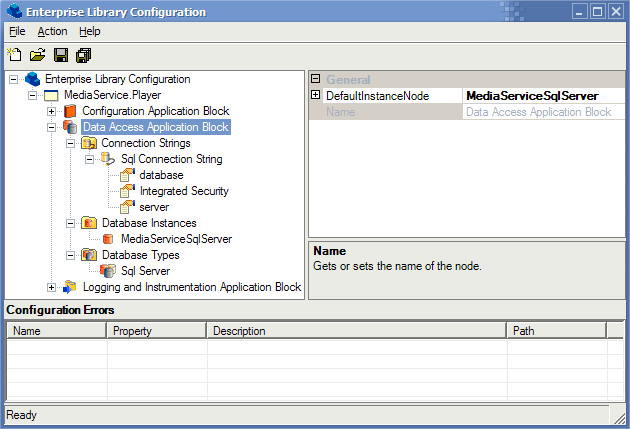
After saving this file, it was possible to create a data implementation for each Accessor interface previously defined in the Data project, for example:
using System;
using System.Data;
using System.Collections;

using MediaService.Logging;
using MediaService.Objects;
using MediaService.Data.Accessors;

using Microsoft.Practices.EnterpriseLibrary.Data;
using Microsoft.Practices.EnterpriseLibrary.Logging;

namespace MediaService.Data.SqlServer {
  public class SongDataAccessor: ISongDataAccessor {
  } /* SongDataAccessor */
} /* MediaService.Data.SqlServer */
Thanks to the Enterprise Library Data Access Application Block, the SQL Server implementation used best practices from the Microsoft Patterns & Practices group, which followed Microsoft guidelines and were optimized for performance.
To get an array of objects from the database, a new Database object had to be created, after which a stored procedure was wrapped, called and read to get, for example, Song objects. This was done with the following code:
public Song[] GetSongs() {
  Database db = DatabaseFactory.CreateDatabase("MediaServiceSqlServer");

  DBCommandWrapper dbCommandWrapper =
                        db.GetStoredProcCommandWrapper("GetSongs");

  Logger.Write("Retrieving songs.", Category.SqlServer,
                Priority.Lowest, 1, Severity.Information);

  ArrayList songs = new ArrayList();
  using (IDataReader dataReader = db.ExecuteReader(dbCommandWrapper)) {
    while (dataReader.Read()) {
      songs.Add(new Song(dataReader.GetInt32(0), dataReader.GetString(1),
                         dataReader.GetString(2), dataReader.GetString(3),
                         dataReader.GetString(4), dataReader.GetString(5),
                         dataReader.GetString(6), dataReader.GetInt32(7),
                         dataReader.GetInt32(8), dataReader.GetInt32(9)));
    }
  }

  Logger.Write(String.Format("Retrieved {0} {1}.", songs.Count,
                             (songs.Count == 1) ? "song" : "songs"),
               Category.SqlServer, Priority.Lowest, 1, Severity.Information);

  return (Song[])songs.ToArray(typeof(Song));
} /* GetSongs */
Updating an item with a parameterized stored procedure was done with the following code:
public void UpdateSongPlayCount(Int32 songId) {
  Database db = DatabaseFactory.CreateDatabase("MediaServiceSqlServer");

  DBCommandWrapper dbCommandWrapper =
                        db.GetStoredProcCommandWrapper("UpdateSongPlayCount");
  dbCommandWrapper.AddInParameter("@songId", DbType.Int32, songId);

  Logger.Write(String.Format("Updating play count for song: {0}.", songId),
               Category.SqlServer, Priority.Lowest, 1, Severity.Information);

  try {
    db.ExecuteNonQuery(dbCommandWrapper);
  } catch (Exception ex) {
    Logger.Write(String.Format("Failed to update play count for song: {0}. " +
                               "Error: {1}", songId, ex.ToString()),
                 Category.SqlServer, Priority.Highest, 1, Severity.Error);
  }
} /* UpdateSongPlayCount */
Using stored procedures made it possible to have another layer of abstraction. This made it easy to change an existing stored procedure to keep track of statistics, without having to change any code of the implementation. At the same time, using stored procedures also protected against SQL injection attacks. After all accessors were implemented, it was possible to use this implementation by deploying the SQL Server DLL and selecting it as data source.



You May Also Like

Data Layer
Why every data-driven application benefits from a separate data layer, and how I added one so the data source can be chosen.

Configuration
Making the internship project configurable with the Enterprise Library Configuration Application Block: XML sections, change notifications and the configuration tool.

Logging
Adding configurable logging to the internship project with the Enterprise Library Logging and Instrumentation Application Block.