

Using DebugView and C#
Originally published on my old blog at cumps.be on August 6, 2007.
DebugView is a very nice tool from Microsoft (by Sysinternals), which allows you to see debug output from the kernel or Win32, local and remote!
Providing debug messages through this system has been possible since Windows 95, so you can trust having debug capabilities everywhere. I strongly believe this to be a very powerful way to provide information about your application, without having to write to log files or attach a debugger. Debugging ASP.NET applications should also be easier when incorporating this.
But how do you make C# use this? You use the System.Diagnostics namespace!
I have created a small demonstration program which writes two messages and a third one conditionally. Putting a prefix in front of the messages will help you filter them out in DebugView afterwards, since other applications might be writing to it as well.
using System;
using System.Diagnostics;

namespace CumpsD.Demo.DebugView
{
  class Program
  {
    static void Main(string[] args)
    {
      Console.WriteLine("Demonstrating System.Diagnostics");
      Console.WriteLine("--------------------------------" + Environment.NewLine);

      Console.WriteLine("Turn on DebugView to look at results.");
      Console.WriteLine("http://www.microsoft.com/technet/sysinternals/utilities/debugview.mspx");
      Console.WriteLine();
      Console.Write("Press any key to continue . . .");
      Console.ReadKey(true);
      Console.WriteLine(Environment.NewLine);

      Debug.Write("DemoCategory: This is written trough System.Diagnostics.Debug.Write.");
      Console.WriteLine("This is written trough System.Diagnostics.Debug.Write.");

      Trace.Write("DemoCategory: This is written trough System.Diagnostics.Trace.Write.");
      Console.WriteLine("This is written trough System.Diagnostics.Trace.Write.");

      bool inDebug = (new Random().Next(0, 2) == 1);
      Debug.WriteIf(inDebug, "This is written because inDebug is true.");

      if (inDebug)
      {
        Console.WriteLine("This is written because inDebug is true.");
      }
      Console.WriteLine(Environment.NewLine + "Look in DebugView to see the messages.");
    }
  }
}
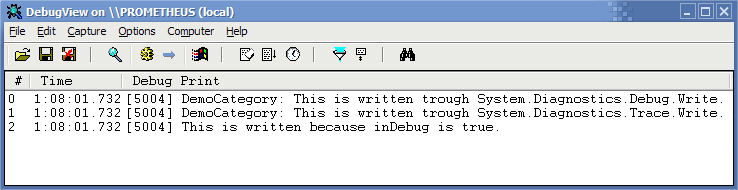
When you run this program, you will get the following output in DebugView:
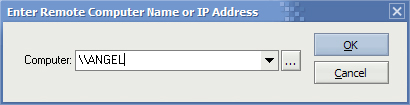
It’s also possible to connect to a remote computer, and intercept these debug messages remotely.
This tool is completely free, which is really amazing for such a powerful and useful tool.



You May Also Like

Remoting Server-Side
Controlling a Windows Service with .NET Remoting instead of ServiceController, which could only send integers and got nothing back.

Boxing/Unboxing in .NET
Boxing and unboxing in .NET: what happens on the stack and the heap, and why the overhead hurts heavy code like path finding.

BlogCast: Alternate Data Streams
My first BlogCast: an 8-minute video on NTFS Alternate Data Streams, demonstrated from the command prompt and in C#.