

Visual Studio 2008 and PHP Coloring
Originally published on my old blog at cumps.be on August 8, 2007.
Visual Studio is a great editor! But when editing other file formats I miss the coloring.
When working with PHP files, it’s great to be able to make a solution to organize PHP sources, and having code open in tabs, but when they all look black and white, I find it requires more focus on my part when coding.
Long ago, I wrote a piece on getting coloring to work in Visual Studio 2002 and 2003. Somehow I managed to skip doing any PHP development during the entire lifetime of Visual Studio 2005, but recently I had to create something small, and I missed my nice colors. I tried to apply my old method in Visual Studio 2008 (Orcas), and this is the result:
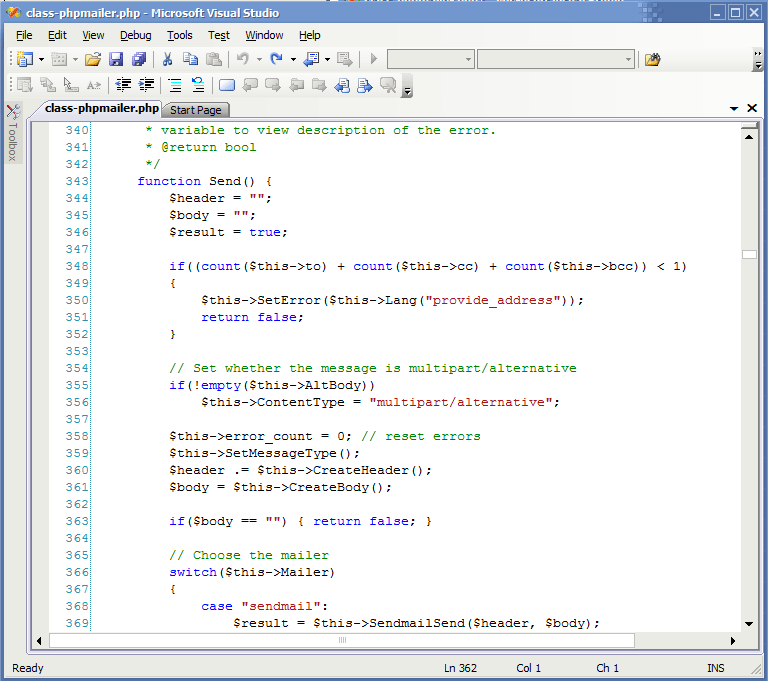
Looks pretty appetizing, doesn’t it?
To get this in Visual Studio 2008, do the following:
- Download vs-php.zip and extract it somewhere.
- Run the registry file for your version (
php_edit2008.regfor Visual Studio 2008, of course). - This creates a file extension association for PHP files, treating them as C++ files.
- Copy
usertype.datto your Visual Studio directory (by defaultC:\Program Files\Microsoft Visual Studio 9.0\Common7\IDE). - Restart Visual Studio if it was open.
- Open a
.phpfile and admire the colors!
For this to work, you need to have C++ support installed! Otherwise the usertype.dat file will not work, since this is specific to .cpp files. You don’t need to install everything for C++, only the following will already work:
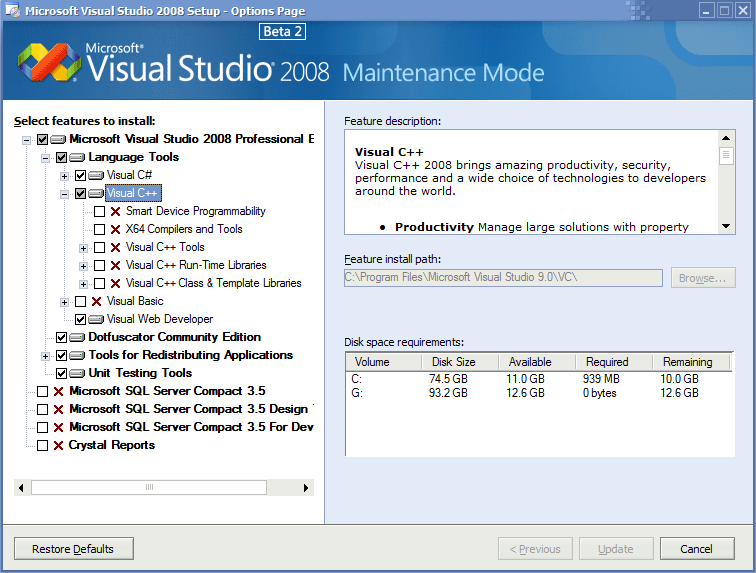
When you look in the registry, you will see that the .php extension looks exactly like the .cpp one. You can also experiment with applying the .cs or .html settings to a .php file, but I found them both lacking. Using the .cs value, you will get coloring from C#, but it will also give you lots of syntax warnings. When using the .html one, it doesn’t always color the entire file.
If you want to color more keywords, open up the usertype.dat file in a text editor, and simply add more words to it.
Enjoy the extra productivity gain!



You May Also Like

ConvertToProperties Macro
The link to the C# property macro from Jan Tielens' .NET Magazine #5 article went missing in print; here it is.

Using DebugView and C#
Writing debug messages from C# with System.Diagnostics and reading them, locally or remotely, with Sysinternals DebugView.

Search File Contents
Windows Search can look inside files, but by default not inside .sql or .php files. One registry key per extension fixes that.