

Explorer Bug: Long Paths and Damaged Directories
Originally published on my old blog at cumps.be on August 21, 2007.
Long ago, I found something strange in Windows Explorer, which I wanted to retry on Vista today.
In Explorer, first create a very big directory tree, consisting of short directory names. Now, from the bottom, rename these directories to about 100 characters.
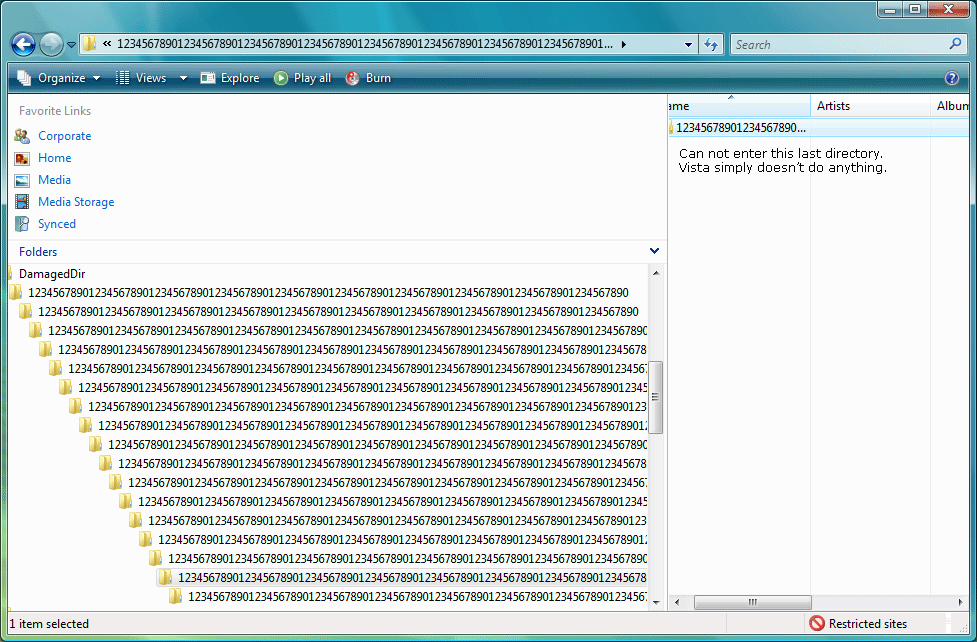
When you reach the top, try browsing the tree. After some directories it won’t allow you to open the directory anymore. You can’t select it (it jumps back), you can’t rename it and you can’t delete the entire tree at once.

To get rid of it, however, you have to start renaming from the top, to all short names again, until you can delete them.
I realize this has something to do with character limits on paths, but this shouldn’t be possible, should it? You can’t even delete them properly. Is there a way to prevent this from happening? Or at least be able to clean it up without too much hassle?
I created a small proof of concept, using three .bat files:
- Extract the zip and run
Destroy.bat. - It will first call
Mtree.batto make a small directory tree, where all directories are named “1”. - Afterwards it calls
Rtree.batto rename the directories to a long name.
Feel free to look at the .bat files with a text editor, to check what they do.
Does anyone know why this is happening? I’d love to know the low-level logic behind this.
Update: the cause is the 260-character MAX_PATH limit on full paths; since Windows 10 version 1607 applications can opt in to longer paths.



You May Also Like

Daemon Tools: The Disk Image Emulator
Daemon Tools mounts a disc image as a virtual drive, so you can install software like Visual Studio 2008 Beta 2 without burning a disc.

XP SP2 Using Alternate Data Streams for Security Warnings
XP SP2 marks downloaded files with a hidden Zone.Identifier stream to trigger its security warning; Firefox 1.0.3 doesn't add it.

BlogCast: Alternate Data Streams
My first BlogCast: an 8-minute video on NTFS Alternate Data Streams, demonstrated from the command prompt and in C#.