

Efficient Compound Index Usage
Originally published on my old blog at cumps.be on September 20, 2007.
Today I was made aware by Filip, a colleague of mine, about the importance of columns used in a WHERE clause with a compound index. I decided to investigate this a bit more in detail, with proper profiling and comparisons on a large data set.
I created a test table, DemoTable, which looks as follows:
ColumnA  varchar(6)
ColumnB  int
ColumnC  int
ColumnD  varchar(3)
..30 more columns..
The primary key consists of ColumnA, ColumnB and ColumnC, which means it also acts as a compound index.
There are about 6.5 million records in the table.
Full Primary Key Lookup
The most obvious query to get data from this table is a simple select, using all values of the primary key, as follows:
SELECT *
  FROM DemoTable
 WHERE ColumnA = 'DCU'
   AND ColumnB = 1
   AND ColumnC = 1
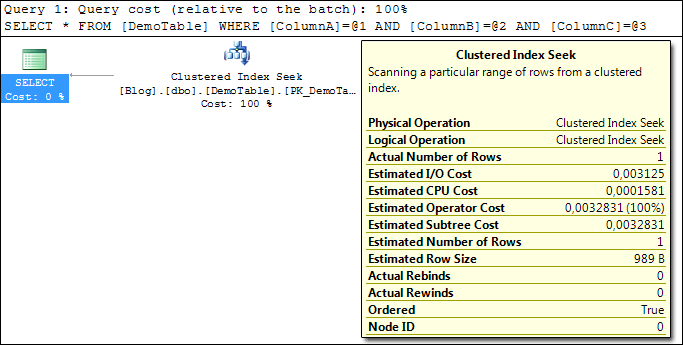
Taking a look at the query plan, this does exactly what most people expect it to do: it uses a very efficient Index Seek to pick out the matching record.
Partial Primary Key Lookup
A variation to the above query is the following one, using only part of the primary key.
SELECT *
  FROM DemoTable
 WHERE ColumnA = 'DCU'
   AND ColumnB = 1
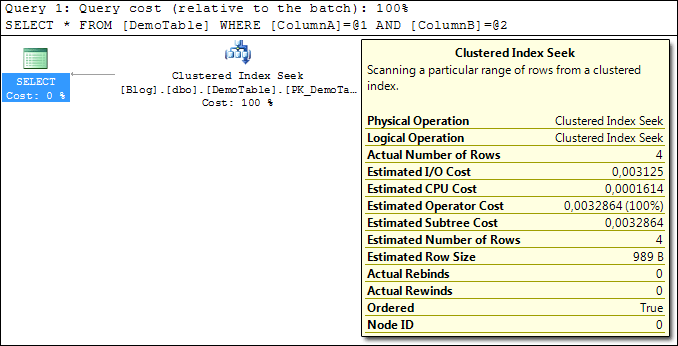
The query plan shows us that this query is also very efficient, since it can make full use of the index to get the results back.
Out of curiosity and to be thorough, I also checked the results of the following query:
SELECT *
  FROM DemoTable
 WHERE ColumnA = 'DCU'
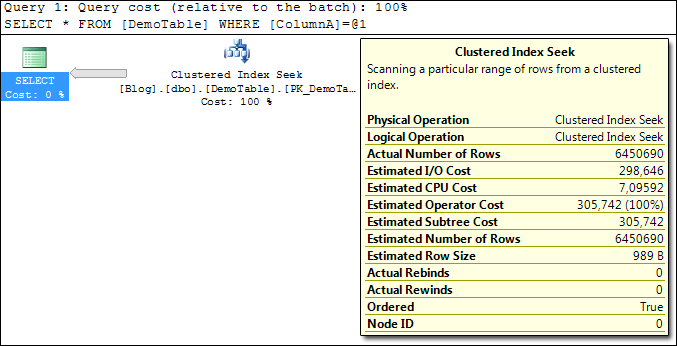
Same story: our index is ordered on ColumnA, ColumnB and ColumnC, so it can easily use a binary search on it and give back all results for ColumnA.
The fun stuff begins when we leave out columns from the WHERE clause in a different order than the index uses, for example this query:
SELECT *
  FROM DemoTable
 WHERE ColumnA = 'DCU'
   AND ColumnC = 1
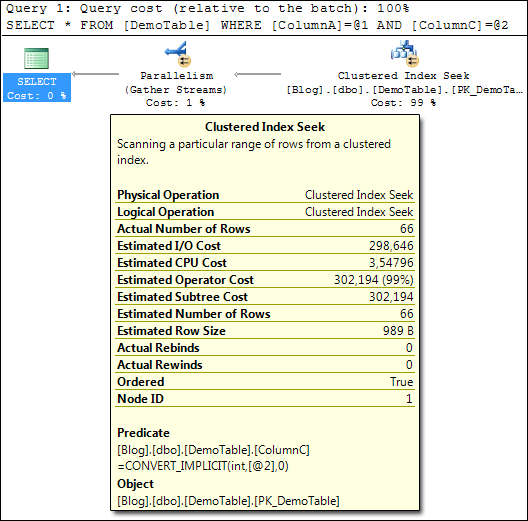
SQL Server will first use an efficient index seek to get all results for the correct ColumnA, since the index is ordered by ColumnA first, and will then search in the remaining results for the correct ColumnC.
In the query plan, you can identify this as the Predicate, which displays ColumnC. In the end, this is still an efficient query, but if the majority of your queries would be filtering on ColumnA and ColumnC, it would be a good idea to change your column order to ColumnA, ColumnC, ColumnB in the index. This way, the overall efficiency of your index would increase.
Another variation of a partial key lookup is the following query:
SELECT *
  FROM DemoTable
 WHERE ColumnB = 1
   AND ColumnC = 1
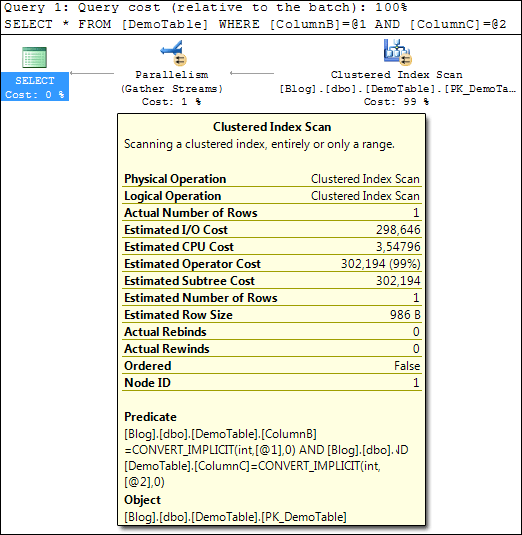
And it’s at this point you can say goodbye to performance. To get the requested results, SQL Server will do a full scan on every value in your index to find matches, going over 6.5 million rows in my example.
If lots of your queries would be like this, I’d suggest considering a different column order, or adding an index on ColumnB and ColumnC. Keep in mind that adding indexes has a drawback on performance of INSERTs and DELETEs; it’s up to each project to define this delicate balance.
Partial Primary Key Lookup Sorted
Another case I wanted to check was how SQL Server handles ORDER BY clauses with regards to columns in an index.
I started simple by doing:
  SELECT *
    FROM DemoTable
   WHERE ColumnA = 'DCU'
     AND ColumnB = 1
ORDER BY ColumnC
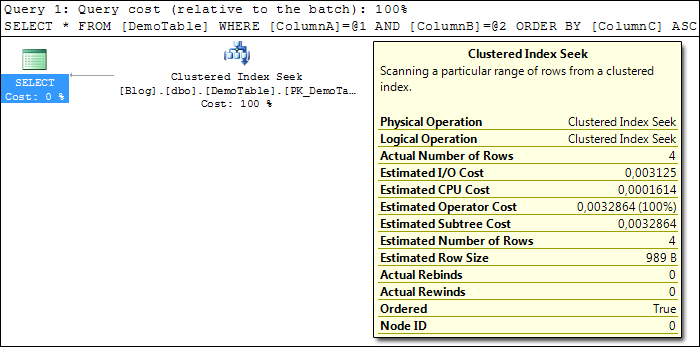
As expected, SQL Server simply does an index seek for ColumnA and ColumnB and returns the results, since they are already ordered by ColumnC in the index. As efficient as possible.
A small variation to this query leaves out the first column of the index, resulting in:
  SELECT *
    FROM DemoTable
   WHERE ColumnB = 1
ORDER BY ColumnC
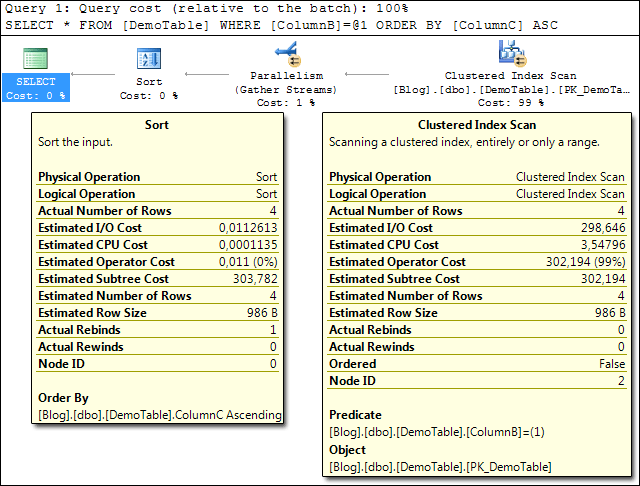
Again, since our WHERE clause is not using the columns in the order of the index, we are invoking a full index scan for the value of ColumnB. Afterwards SQL Server calls Sort on the results to get them in the correct order. As inefficient as possible :)
Conclusions
It should be clear that the order of your columns in an index is very important. I’ve made up some guidelines for myself regarding this:
- Place the most limiting columns first in an index. By this, I mean to first determine which queries I will be running against the database, determining their frequency and then ordering the columns according to the most frequently run queries.
- Place an additional index if needed. After I’ve ordered my columns to be as efficient as possible and see that another set of queries is run so frequently that it needs optimization, possibly add another index on a subset of the columns in the first index. Keep in mind for which purpose the table should be optimised (e.g. SELECT versus INSERT/DELETE).



You May Also Like

String Concatenation vs Memory Allocation
Five ways to build the same string in C#, compared on string instances and memory in a profiler: +, +=, String.Concat, StringBuilder and AppendFormat.

Search File Contents
Windows Search can look inside files, but by default not inside .sql or .php files. One registry key per extension fixes that.

Reverse Engineering with Reflector and Reflexil
Cracking a small password check in a .NET assembly by flipping one IL branch with Reflector and the Reflexil add-in.